Office Defender Arcade Game
Reviews
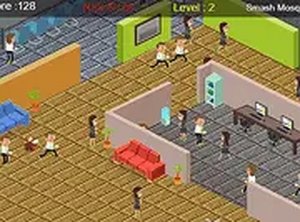
Office Defender is a delightful arcade game that offers a clean, family-friendly experience. The simple tap controls make it easy to pick up, while the gradually increasing difficulty keeps you engaged. The office theme is lighthearted and relatable. Best of all, it's free with no downloads, so you can jump in anytime. A great choice for casual gaming.
Description
Game Introduction
Office Defender is a fast-paced arcade game set in a busy office environment. The core objective is to stop pesky distractions from interfering with workers. The game starts simply, but each successful action causes more distractions to appear, gradually increasing the difficulty. Designed for all ages, it offers a clean, family-friendly experience that can be played directly in your browser without any downloads. The escalating challenge keeps you alert and provides a satisfying test of reflexes. The office setting adds a relatable and lighthearted theme, making it enjoyable for casual players and those looking for a quick mental break.
How to Play
To play, simply tap or click on the distractions as they appear on the screen. Each successful tap counts toward your level goal. You must clear a set number of distractions to advance to the next stage. As you progress, the distractions move faster and appear in larger groups. The controls are simple and responsive, making it easy for anyone to start playing immediately. For a more immersive view, you can switch to full screen mode. No special skills or prior experience are required, making it accessible to players of all ages.
Game Features
Fun and addictive gameplay that is easy to learn. Simple tap or click controls work on both touchscreens and mice. The difficulty increases gradually to keep you challenged. Full screen mode is available for better focus. The game is completely free to play with no downloads or registration needed. It works on desktop and mobile devices, allowing you to enjoy it anywhere.
Tips for Success
Stay focused and react quickly to keep up with the increasing speed and number of distractions. Practice regularly to improve your reflexes. Learn to anticipate where distractions appear next. Use full screen mode to minimize distractions. Remember that each successful action causes more distractions to appear, so plan your moves accordingly. Keep tapping or clicking steadily and see how many levels you can complete.
Compatibility
Faq
Is Office Defender available on mobile devices?
Do I need to create an account to play Office Defender?
Can I play Office Defender offline?
Are there different difficulty modes in Office Defender?
Does Office Defender have sound effects or music?
How many levels are in Office Defender?
More Games

Min Hero: Tower of Sages RPG
A delightful turn-based RPG with creature collection and wizard challenges, perfect for family play.

Secure Vault Challenge
A clever puzzle game that rewards planning and patience. Great for family fun.

Foot Fury Action Adventure
A fun, family-friendly action game that uses kicking mechanics and offers customization for a personalized experience.

Dynasty Warriors Advance Tactical Action
A solid portable tactical action game with strategic depth and multiple characters.

Castle Clash Strategy Card Game
Castle Clash is a safe, fun card game that encourages creative strategy in a friendly setting.

Mystic Defense 3 Strategy Game
A fun, family-friendly strategy game with magical defenses and engaging levels for all ages.
Restless Place Defender
A charming pixel-style arcade game with strategic ball mechanics. Simple, fun, and family-safe.

Physique Builder: Fitness Deck-Building Game
A unique blend of fitness and deck-building that offers strategic depth and high replayability.

Carrier Fleet Merge Idle
A relaxing idle merge game that is easy to play and free on any device.